Air Discover1.15
Publisher Description

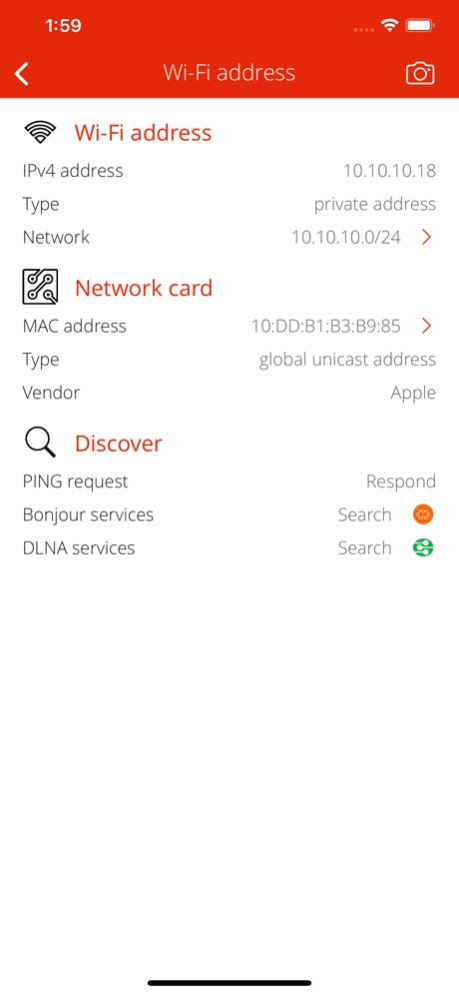


It is time to analyze your local Wi-Fi network! Air Discover is a very fast and professional network scanner utility to detect network devices and services. It helps you to resolve network issues, find unnecessary and possible dangerous network services...or just explore your home or office network environmental.
DISCOVER NETWORK CONNECTION
. Detect current network type (Wi-Fi, Cellular, Bluetooth PAN, VPN tunnel).
. Show DNS servers, search domain names, local MAC addresses, host name resolve.
. Show default gateways, IP addresses, networks.
. Show Wi-Fi hotspot SSID (service set identification), MAC address, IP address and vendor informations.
. Detect current cellular network operator name, country, region, cellular connection mode (GPRS, EDGE, UMTS, HSPA, LTE).
. Show VPN connection (if any) address, DNS hostname, WHOIS record, PING capability, ISP details, address space type (RIR), autonomous system (AS).
. Detect current VPN tunnel type. Support Cisco IPSec, PPTP or L2TP.
DISCOVER INTERNET INFO
. Depth external address analysis: ISP name, autonomous system name, whois, ping, regional internet registry info.
. Full offline MAC vendor database.
DISCOVER BONJOUR SERVICES
. Search for available and currently running Bonjour services.
. Analyze and describe Bonjour service name, type, protocol, port, IP addresses and other properties.
. Show Bonjour host local name, domain name, MAC address (with vendor informations), PING capability.
DISCOVER DLNA DEVICES
. Search for available and currently running DLNA (UPnP) root and embedded devices and services.
. Analyze and describe device name, manufacturer, model, type, version, serial number, UPC code, etc.
. Determine operating system/version and UPnP server product and version.
. Show DLNA host IP address, port number, UPnP version, local name, domain name, MAC address (with vendor informations), PING capability.
REACH UI FEATURES
. Info menu with feedback and privacy settings
. Use the camera icon (upper-right corner) to create and print/send/share a screenshot from the entire page.
. Pull down with your finger to refresh the informations.
. Long press on a cell to copy/print/send/open as/share the cell value.
. Shake your device to refresh the informations.
Version History DEVICE SUPPORT
• iPhone SE (2020) support. 1.15 05/25/2020 DEVICE SUPPORT
• iPhone 8 and 8 Plus support. 1.14 11/02/2017 DEVICE SUPPORT
• iPad 5th. gen (2017) support.
DEVICE INFO
• Show device's release year.
USER INTERFACE IMPROVEMENTS
• Setting for turning off automatic device sleep. 1.13 06/14/2017 USER INTERFACE IMPROVEMENTS
• Better Wi-Fi Hotspot detection. 1.12 03/17/2017 USER INTERFACE IMPROVEMENTS
• Turn on/off suggested apps.
MAC DATABASE UPDATE
• 22947 large address blocks. 1.11 03/01/2017 DEVICE DETECTION IMPROVEMENTS
• Detect cloud proxy devices and cloud transport services.
IMPROVED DLNA DEVICE/SERVICE DETAILS
• Describe UPnP specification versions.
• Analyze network port number type. 1.10 12/09/2016 USER INTERFACE IMPROVEMENTS
• Dynamic font: using user's preferred font size.
• System font: using system font instead of custom font.
• Show current preferred font size.
ENHANCED INFO MENU
• Guided help for send e-mail.
• Useful utility and science apps suggestions. 1.9 12/03/2016 3D TOUCH SUPPORT
• Home Screen Quick Actions.
• Easy access to default gateways, DNS servers, external address and contact information.
NETWORK SEARCH SETTINGS
• Turn on/off PING and WHOIS query of network nodes.
OPTIONAL NETWORK DISCOVER FEATURES
• Explain Wi-Fi, cellular, VPN and hotspot network properties of a default gateway or DNS server.
• Find DLNA and Bonjour services of a Wi-Fi hotspot, default gateway or DNS server.
• Search for MAC vendors or MAC addresses. 1.8 10/17/2016 DEVICE SUPPORT
• iPhone 7 and 7 Plus support.
PLATFORM SUPPORT
• iOS 10.x support.
• Drop iOS 6.x support.
• Drop iOS 7.x support. 1.7 10/02/2016 IMPROVED BONJOUR SERVICE DETAILS
• Show service type tech name.
• Analyze transport protocol.
• Analyze network port number type.
BONJOUR SERVICE SUPPORT ADDED
• Apple TV remote app.
MAC DATABASE UPDATE
• 22290 large address blocks. 1.6 08/29/2016 DEVICE SUPPORT
• iPhone SE.
• iPad Pro (12.9" and 9.7").
ENGINE IMPROVEMENTS
• Stabilization and performance. 1.5 05/21/2016 ENGINE IMPROVEMENTS
• iOS 9 support.
• iPhone 6s support.
• iPhone 6s Plus support. 1.4 10/06/2015 USER INTERFACE IMPROVEMENTS
• Better iPhone 6 user experience.
• Better iPhone 6 Plus user experience. 1.3 09/10/2015 USER INTERFACE IMPROVEMENTS
• Video guides in Info menu. 1.2 08/03/2015 BONJOUR SERVICE SUPPORT ADDED
• AirControl
• Airkan
• AirVideo Server
• Air Video HD
• Amazon Play! Framework
• Anymote
• Aquarium
• Audiobus
• Axis Video
• BlackBerry P2P
• Bose SoundTouch setup
• Chromium OS P2P
• D-Link HNAP service
• Google Cast
• Hearing device
• Hobbyist Software VLC stream
• iShutdown
• Kodi (XBMC)
• LifeLine device
• MedicPro server
• Mobile camera
• NI Logos
• NoMachine
• OpenDirectory Proxy
• Pixate server
• Plex Media Server
• Privet (Cloud API)
• QNAP MyNAS
• Remote Control
• Remote Desktop Print
• Rogue Amoeba
• Rowmote
• Roku Server
• Ruckus ZoneDirector
• Scanner
• Seagate BlackArmor
• Seagate Satellite wireless storage
• Spotify Connect
• SyncService
• TextExpander
• TiVo
• Ubuntu remote disk
• Vshare (AppVV)
• WD NAS
• WD TV Live Remote
• Withings Aura
ENGINE IMPROVEMENTS
• Better IPv6 handling.
APPLICATION SPEED UP
• Faster network analysis.
• Faster application launch.
• Smaller binary size. 1.1 05/28/2015 1.0 04/22/2015
About Air Discover
The company that develops Air Discover is Csaba Iranyi. The latest version released by its developer is 1.15.
To install Air Discover on your iOS device, just click the green Continue To App button above to start the installation process. The app is listed on our website since 2026-07-23 and was downloaded 14 times. We have already checked if the download link is safe, however for your own protection we recommend that you scan the downloaded app with your antivirus. Your antivirus may detect the Air Discover as malware if the download link is broken.
How to install Air Discover on your iOS device:
- Click on the Continue To App button on our website. This will redirect you to the App Store.
- Once the Air Discover is shown in the iTunes listing of your iOS device, you can start its download and installation. Tap on the GET button to the right of the app to start downloading it.
- If you are not logged-in the iOS appstore app, you'll be prompted for your your Apple ID and/or password.
- After Air Discover is downloaded, you'll see an INSTALL button to the right. Tap on it to start the actual installation of the iOS app.
- Once installation is finished you can tap on the OPEN button to start it. Its icon will also be added to your device home screen.
Program Details
System requirements
Download information
Pricing
Version History
version 1.15
posted on 2026-07-23
Version History DEVICE SUPPORT
• iPhone SE (2020) support. 1.15 05/25/2020 DEVICE SUPPORT
• iPhone 8 and 8 Plus support. 1.14 11/02/2017 DEVICE SUPPORT
• iPad 5th. gen (2017) support.
DEVICE INFO
• Show device's release year.
USER INTERFACE IMPROVEMENTS
• Setting for turning off automatic device sleep. 1.13 06/14/2017 USER INTERFACE IMPROVEMENTS
• Better Wi-Fi Hotspot detection. 1.12 03/17/2017 USER INTERFACE IMPROVEMENTS
• Turn on/off suggested apps.
MAC DATABASE UPDATE
• 22947 large address blocks. 1.11 03/01/2017 DEVICE DETECTION IMPROVEMENTS
• Detect cloud proxy devices and cloud transport services.
IMPROVED DLNA DEVICE/SERVICE DETAILS
• Describe UPnP specification versions.
• Analyze network port number type. 1.10 12/09/2016 USER INTERFACE IMPROVEMENTS
• Dynamic font: using user's preferred font size.
• System font: using system font instead of custom font.
• Show current preferred font size.
ENHANCED INFO MENU
• Guided help for send e-mail.
• Useful utility and science apps suggestions. 1.9 12/03/2016 3D TOUCH SUPPORT
• Home Screen Quick Actions.
• Easy access to default gateways, DNS servers, external address and contact information.
NETWORK SEARCH SETTINGS
• Turn on/off PING and WHOIS query of network nodes.
OPTIONAL NETWORK DISCOVER FEATURES
• Explain Wi-Fi, cellular, VPN and hotspot network properties of a default gateway or DNS server.
• Find DLNA and Bonjour services of a Wi-Fi hotspot, default gateway or DNS server.
• Search for MAC vendors or MAC addresses. 1.8 10/17/2016 DEVICE SUPPORT
• iPhone 7 and 7 Plus support.
PLATFORM SUPPORT
• iOS 10.x support.
• Drop iOS 6.x support.
• Drop iOS 7.x support. 1.7 10/02/2016 IMPROVED BONJOUR SERVICE DETAILS
• Show service type tech name.
• Analyze transport protocol.
• Analyze network port number type.
BONJOUR SERVICE SUPPORT ADDED
• Apple TV remote app.
MAC DATABASE UPDATE
• 22290 large address blocks. 1.6 08/29/2016 DEVICE SUPPORT
• iPhone SE.
• iPad Pro (12.9" and 9.7").
ENGINE IMPROVEMENTS
• Stabilization and performance. 1.5 05/21/2016 ENGINE IMPROVEMENTS
• iOS 9 support.
• iPhone 6s support.
• iPhone 6s Plus support. 1.4 10/06/2015 USER INTERFACE IMPROVEMENTS
• Better iPhone 6 user experience.
• Better iPhone 6 Plus user experience. 1.3 09/10/2015 USER INTERFACE IMPROVEMENTS
• Video guides in Info menu. 1.2 08/03/2015 BONJOUR SERVICE SUPPORT ADDED
• AirControl
• Airkan
• AirVideo Server
• Air Video HD
• Amazon Play! Framework
• Anymote
• Aquarium
• Audiobus
• Axis Video
• BlackBerry P2P
• Bose SoundTouch setup
• Chromium OS P2P
• D-Link HNAP service
• Google Cast
• Hearing device
• Hobbyist Software VLC stream
• iShutdown
• Kodi (XBMC)
• LifeLine device
• MedicPro server
• Mobile camera
• NI Logos
• NoMachine
• OpenDirectory Proxy
• Pixate server
• Plex Media Server
• Privet (Cloud API)
• QNAP MyNAS
• Remote Control
• Remote Desktop Print
• Rogue Amoeba
• Rowmote
• Roku Server
• Ruckus ZoneDirector
• Scanner
• Seagate BlackArmor
• Seagate Satellite wireless storage
• Spotify Connect
• SyncService
• TextExpander
• TiVo
• Ubuntu remote disk
• Vshare (AppVV)
• WD NAS
• WD TV Live Remote
• Withings Aura
ENGINE IMPROVEMENTS
• Better IPv6 handling.
APPLICATION SPEED UP
• Faster network analysis.
• Faster application launch.
• Smaller binary size. 1.1 05/28/2015 1.0 04/22/2015
version 1.15
posted on 2020-05-25
May 25, 2020 Version 1.15
DEVICE SUPPORT
• iPhone SE (2020) support.
version 1.15
posted on 2020-05-25
25 May 2020 Version 1.15
DEVICE SUPPORT
• iPhone SE (2020) support.
version 1.15
posted on 2020-05-25
DEVICE SUPPORT
• iPhone SE (2020) support.
version 1.14
posted on 2017-11-02
Nov 2, 2017 Version 1.14
DEVICE SUPPORT
• iPhone 8 and 8 Plus support.
version 1.14
posted on 2017-11-02
2. Nov. 2017 Version 1.14
DEVICE SUPPORT
• iPhone 8 and 8 Plus support.
version 1.8
posted on 2015-04-24
version 1.15
posted on 1970-01-01
2020年5月25日 Version 1.15
DEVICE SUPPORT
• iPhone SE (2020) support.
version 1.15
posted on 1970-01-01
25 мая 2020 г. Version 1.15
DEVICE SUPPORT
• iPhone SE (2020) support.
